> ## Documentation Index
> Fetch the complete documentation index at: https://docs.vortexiq.ai/llms.txt
> Use this file to discover all available pages before exploring further.
# Migration History & Code Deployments in StagingPro for BigCommerce
Migration History is the StagingPro audit surface and the recovery mechanism. Every data migration and theme deployment lands here with full provenance: who initiated it, what entities were touched, when it ran, where data went, and the result. From the same screen you can roll a botched change back to the previous state with one click.
 ## Migration History tab
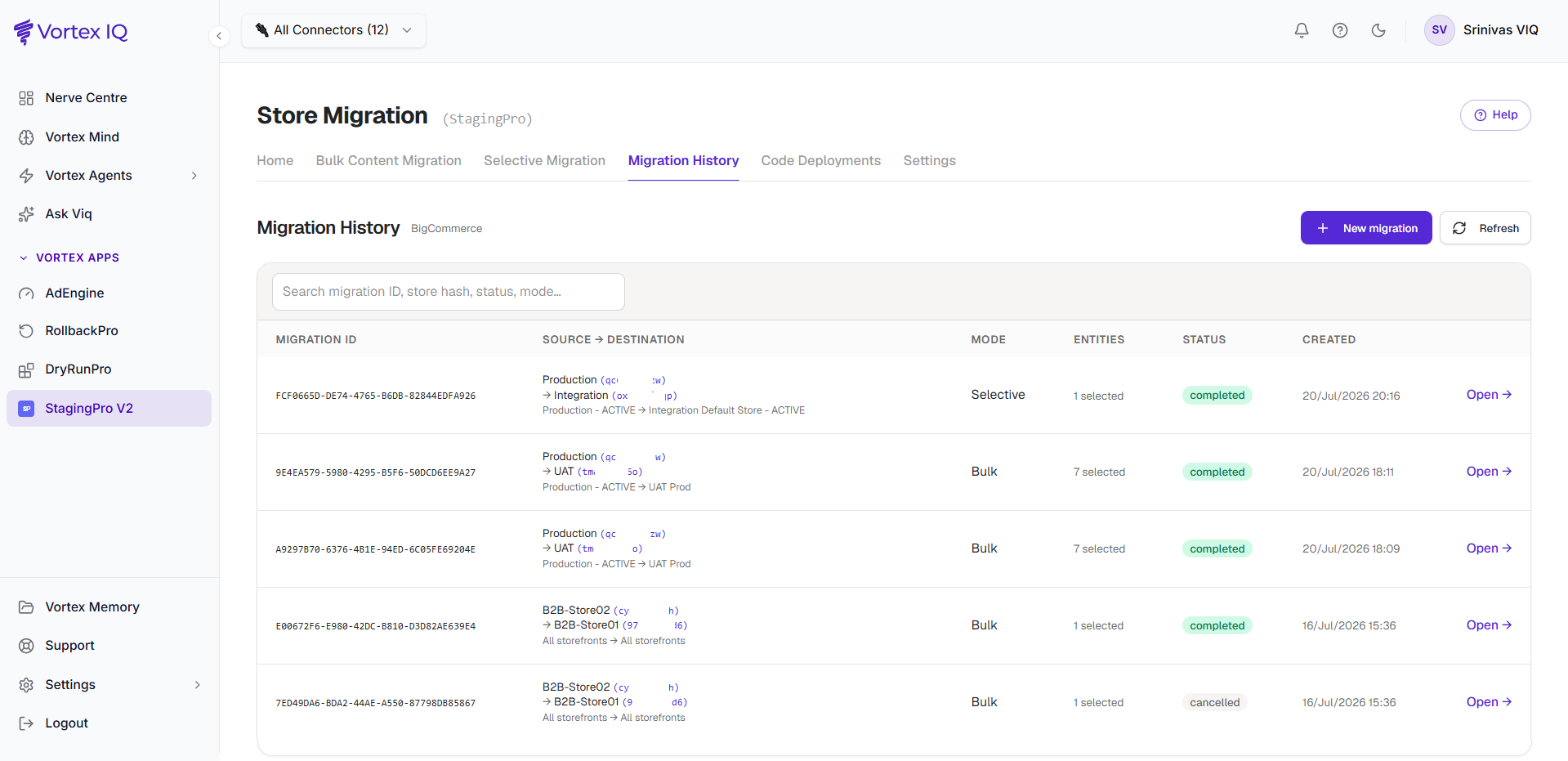
This tab lists every migration with its source environment, destination environment, start and end timestamps, and current status.
### Reading a migration row
Each row shows:
| Column | Meaning |
| --------------------------- | ----------------------------------------------------------------------------------------------------------- |
| **Request ID** | Unique identifier (e.g. `20FDC58D-CC9D-4586-956B-B8AECC5B2C0C`). Quote this to support if logging a ticket. |
| **Source Environment** | Where the data came from |
| **Destination Environment** | Where the data went |
| **Started at** | Migration start timestamp |
| **Status** | Current state (see status meanings below) |
| **Completed at** | Migration end timestamp |
Status meanings:
| Status | Meaning |
| --------------------- | ----------------------------------------------------------- |
| **Publish Completed** | Migration finished and data is published to the destination |
| **Completed** | Processing finished |
| **In Progress** | Currently running |
| **Pending** | Queued, not yet started |
| **Failed** | An error occurred, click into details |
| **Cancelled** | Manually stopped before completion |
### Drilling into per-entity detail
Click **Open→** to expand the migration:
## Migration History tab
This tab lists every migration with its source environment, destination environment, start and end timestamps, and current status.
### Reading a migration row
Each row shows:
| Column | Meaning |
| --------------------------- | ----------------------------------------------------------------------------------------------------------- |
| **Request ID** | Unique identifier (e.g. `20FDC58D-CC9D-4586-956B-B8AECC5B2C0C`). Quote this to support if logging a ticket. |
| **Source Environment** | Where the data came from |
| **Destination Environment** | Where the data went |
| **Started at** | Migration start timestamp |
| **Status** | Current state (see status meanings below) |
| **Completed at** | Migration end timestamp |
Status meanings:
| Status | Meaning |
| --------------------- | ----------------------------------------------------------- |
| **Publish Completed** | Migration finished and data is published to the destination |
| **Completed** | Processing finished |
| **In Progress** | Currently running |
| **Pending** | Queued, not yet started |
| **Failed** | An error occurred, click into details |
| **Cancelled** | Manually stopped before completion |
### Drilling into per-entity detail
Click **Open→** to expand the migration:
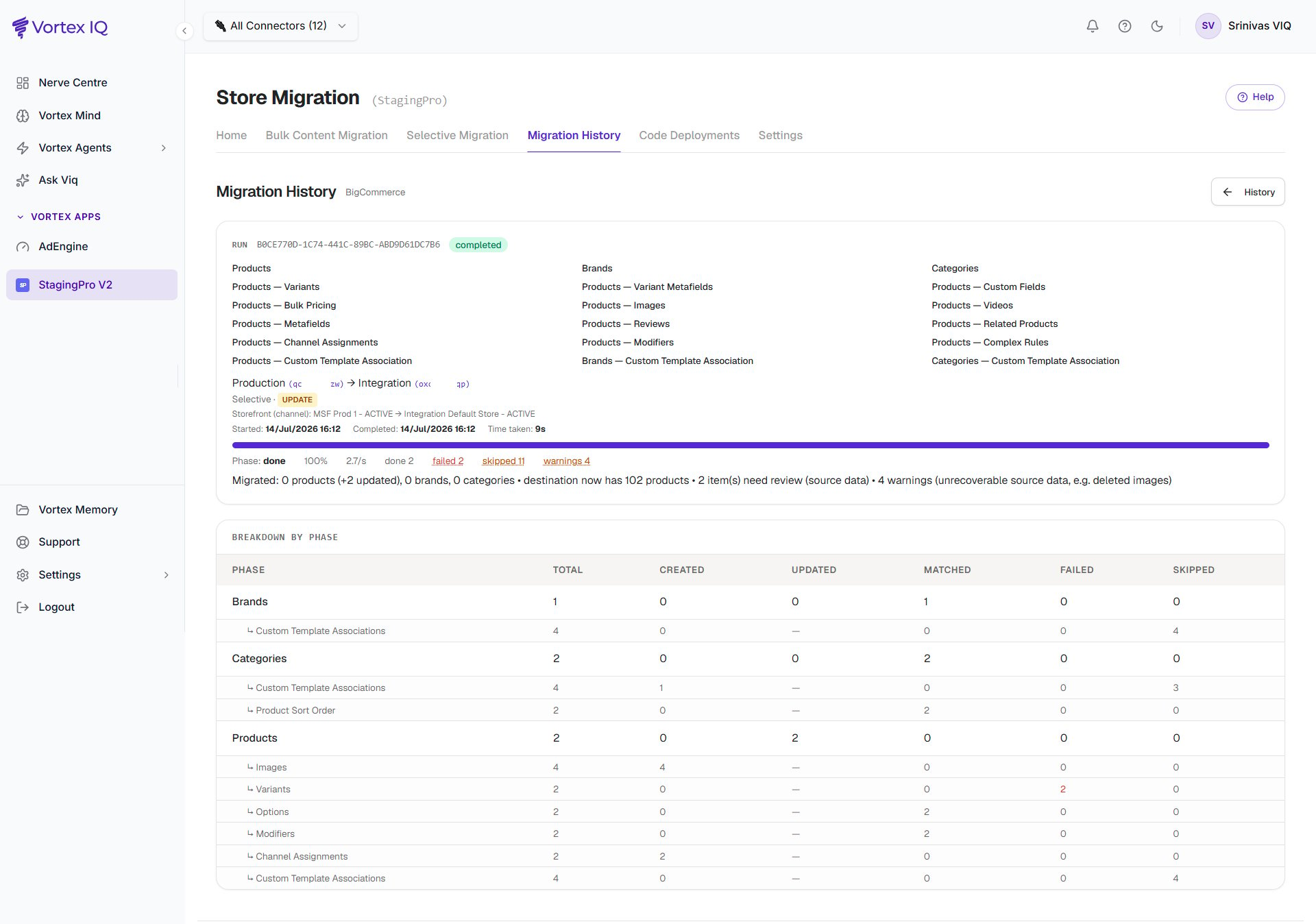 The expanded view lists each entity (e.g. Page Templates, Products, Categories) with:
| Column | Meaning |
| --------------- | --------------------------------------- |
| **Entity** | Type of data migrated |
| **Source** | Source environment for this entity |
| **Destination** | Destination environment for this entity |
| **Status** | Per-entity status indicator |
| **Errors** | Error details if any issues occurred |
## Code Deployments tab
The Code Deployment tab tracks theme deployments from the connected repository:
The expanded view lists each entity (e.g. Page Templates, Products, Categories) with:
| Column | Meaning |
| --------------- | --------------------------------------- |
| **Entity** | Type of data migrated |
| **Source** | Source environment for this entity |
| **Destination** | Destination environment for this entity |
| **Status** | Per-entity status indicator |
| **Errors** | Error details if any issues occurred |
## Code Deployments tab
The Code Deployment tab tracks theme deployments from the connected repository:
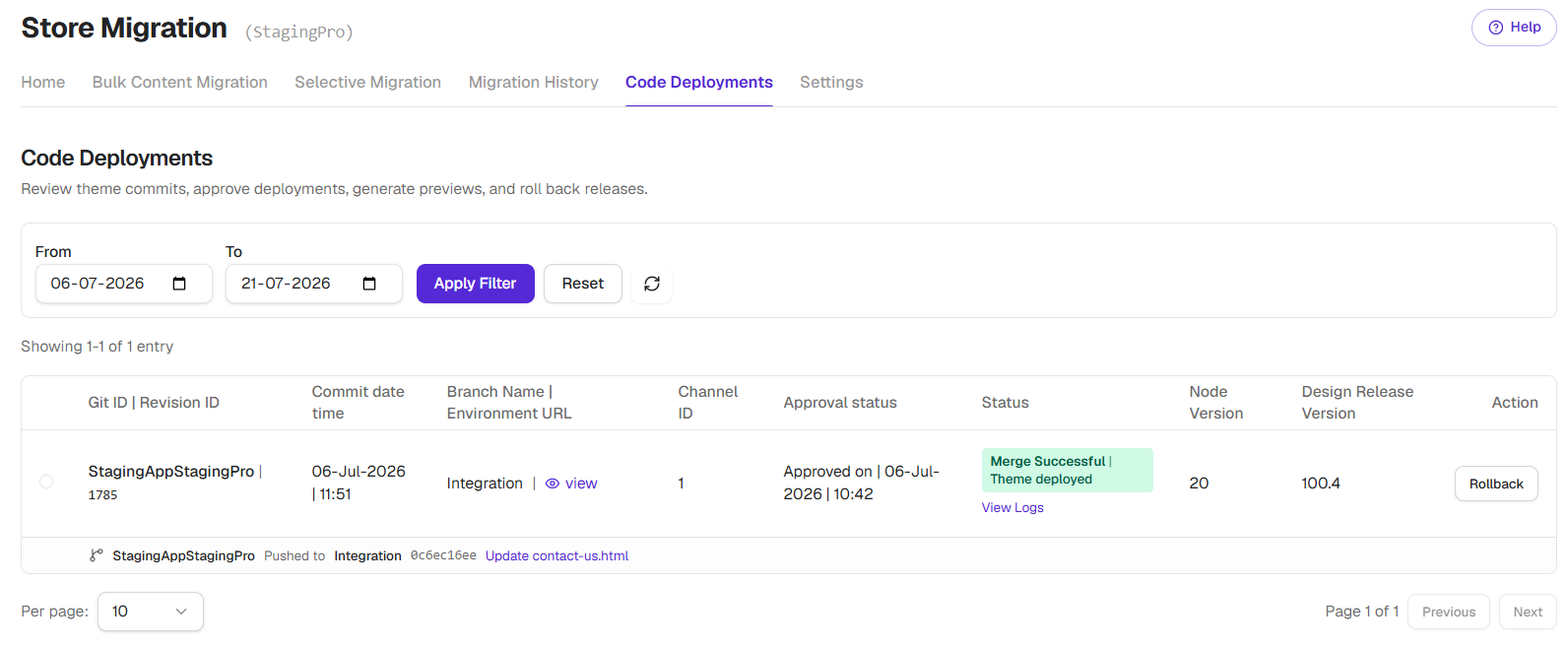 Each row:
| Column | Meaning |
| --------------------------------- | ------------------------------------- |
| **Git ID / Revision ID** | Reference to the code commit |
| **Commit date time** | When the code was committed |
| **Branch Name / Environment URL** | Which branch and where it deployed |
| **Channel ID** | The BigCommerce channel targeted |
| **Approval status** | Whether the deployment was approved |
| **Status** | Deployment state |
| **Design Release Version** | Theme version number |
| **Action** | Deploy, View Logs, Rollback, Schedule |
### Approval workflow
Code deployments may require approval before going live:
* **Pending Approval**, deployment is waiting for review.
* **Approved**, deployment will proceed.
* **Rejected**, deployment will not run.
Available actions depending on state:
* **Deploy**, push the theme to the target environment.
* **View Logs**, inspect detailed deployment logs.
* **Rollback**, revert to a previous theme version.
* **Schedule**, set a future deployment time.
Deployments may take 15 to 20 minutes after approval, depending on theme size. The bottleneck is BigCommerce assembling the theme bundle and accepting the upload, not StagingPro itself.
### Theme Rollback
The Action column on Code Deployment offers Rollback. Click it, and StagingPro redeploys the previous theme version to the same environment.
**s**15 to 20 minutes for the rollback bundle to land on BigCommerce. Useful when a theme deploy regressed checkout or broke a key page.
## Audit trail summary
The Migration History section gives you a complete audit trail:
* **Who**, the system records which account initiated the action.
* **What**, exactly which entities were migrated.
* **When**, precise timestamps for every activity.
* **Where**, source and destination environments.
* **Result**, success, partial, or failure with error details.
**Useful for** compliance reporting, post-incident review, change management, team coordination, troubleshooting handoffs to support.
## Best practices
| Practice | Why |
| ------------------------------------------------------------------- | --------------------------------------------------------------- |
| Check the Migration History tab after every migration. | Detect issues early while they're easier to investigate. |
| Review failed items as soon as possible. | Distinguish temporary failures from issues that require action. |
| Include Request IDs in all team communications and support tickets. | Expedites troubleshooting and support. |
| Record any manual changes made outside the migration. | Preserves a complete audit trail. |
| Do not rename auto-generated github branches. | Ensures accurate commit tracking. |
### Before contacting support
Please gather the following information and send, to enable our team in resolving the issue quickly:
* Request ID of the problematic migration.
* Started at and Completed at timestamps.
* Error messages from the per-entity view.
* Source and destination environments.
Each row:
| Column | Meaning |
| --------------------------------- | ------------------------------------- |
| **Git ID / Revision ID** | Reference to the code commit |
| **Commit date time** | When the code was committed |
| **Branch Name / Environment URL** | Which branch and where it deployed |
| **Channel ID** | The BigCommerce channel targeted |
| **Approval status** | Whether the deployment was approved |
| **Status** | Deployment state |
| **Design Release Version** | Theme version number |
| **Action** | Deploy, View Logs, Rollback, Schedule |
### Approval workflow
Code deployments may require approval before going live:
* **Pending Approval**, deployment is waiting for review.
* **Approved**, deployment will proceed.
* **Rejected**, deployment will not run.
Available actions depending on state:
* **Deploy**, push the theme to the target environment.
* **View Logs**, inspect detailed deployment logs.
* **Rollback**, revert to a previous theme version.
* **Schedule**, set a future deployment time.
Deployments may take 15 to 20 minutes after approval, depending on theme size. The bottleneck is BigCommerce assembling the theme bundle and accepting the upload, not StagingPro itself.
### Theme Rollback
The Action column on Code Deployment offers Rollback. Click it, and StagingPro redeploys the previous theme version to the same environment.
**s**15 to 20 minutes for the rollback bundle to land on BigCommerce. Useful when a theme deploy regressed checkout or broke a key page.
## Audit trail summary
The Migration History section gives you a complete audit trail:
* **Who**, the system records which account initiated the action.
* **What**, exactly which entities were migrated.
* **When**, precise timestamps for every activity.
* **Where**, source and destination environments.
* **Result**, success, partial, or failure with error details.
**Useful for** compliance reporting, post-incident review, change management, team coordination, troubleshooting handoffs to support.
## Best practices
| Practice | Why |
| ------------------------------------------------------------------- | --------------------------------------------------------------- |
| Check the Migration History tab after every migration. | Detect issues early while they're easier to investigate. |
| Review failed items as soon as possible. | Distinguish temporary failures from issues that require action. |
| Include Request IDs in all team communications and support tickets. | Expedites troubleshooting and support. |
| Record any manual changes made outside the migration. | Preserves a complete audit trail. |
| Do not rename auto-generated github branches. | Ensures accurate commit tracking. |
### Before contacting support
Please gather the following information and send, to enable our team in resolving the issue quickly:
* Request ID of the problematic migration.
* Started at and Completed at timestamps.
* Error messages from the per-entity view.
* Source and destination environments.